




All Projects
create - produce - run - analyze Performance TV Ads
Drop in your product page URL to create TV ads in minutes. Ruliad runs on proprietary open weight models, purpose built to run powerful agentic TV ad production, media and analytic harnesses that we trained on thousands of world-class creatives and ad industry experts to democratize and unlock A-List advertising for SMBs.


Voiceover Studio
Music Studio / Jingle Maker
Generate your TV ad's music & jingles.
Write a short brand prompt and Ruliad will draft the lyrics with Gemini, render the sung jingle, or stay instrumental if you prefer. This studio is optimized for advertiser jingles, not just background beds.
Recent Projects
Workflow Setup
Would you like to start a new project or continue working on an existing campaign?
Name Your Project
Give your new quick project a name to get started immediately.
Assemble Production Team
Select up to 3 Directors to govern this session.
Ruliad M2M v2
Legacy Identity Recovery
Most users now set this during signup onboarding. This screen appears only if your profile is missing principal identity.
Default trust T1_claimed: normal workspace controls.
Human selected. Directly operate Ruliad with human oversight and approvals.
 ONBOARDING
Protected by Ruliad Secure Auth
Who will operate Ruliad?
Choose the operating principal before choosing a payment method.
How will your agent pay?
Choose one funding path. Pricing and spending authority are checked before any paid action.
Pay with x402
Live discovery and pricing are free. Your agent must verify a fresh quote, spend cap, network, and receipt before each eligible payment. Never paste a wallet secret here.
Agent connection brief
Awaiting live discovery.
Only live_x402 actions are purchasable. Estimate-only actions are not a payment offer. This page never executes a transfer.
Identity Protocol
Create your credits account. Your operating principal and funding path are saved in this tab.
Pick an operating principal and organization type.

YOUR BRAND
EXPERIENCE THE FUTURE
Initialization Complete
Your secure workspace is ready. Verify your mission parameters below.
Production Architect
Forensic Setup Protocol.
Setup
Brand + Product
Talent
Shapes The Script
Scripts
Team-Guided Lock
Launch
Final Review
Storyboard
Shot Builder
Editor
Final Assembly
Brand
Define the advertiser, offer, and project naming for this production architecture.
Optional. Leave blank to use brand + product.
Market Intelligence Payload (Media Trends)
Awaiting Media Trends Agent Signal...
Campaign Parameters
Define the specific goals and duration for this mission.
TV Ad Production

Creative Strategy
Media Planning
Choose whether the ad should default to a commercial music bed with VO or a jingle-led audio path.
Choose the main platform or retail channel this ad is being built for.
Choose the storytelling style you want, like direct address, testimonial, promo, or product-led.
Lock graphics behavior before generation so Motion Typographer can define CTA hierarchy, safe zones, and end-card rules before keyframes.
TV Ad Production Script Protocol
30-second TV production with full script build, guided assets, script lock, and launch automation.
- Duration: 30s
- Use 16:9 for TV/CTV campaigns, Amazon DSP placements, and sponsorship inventory.
- Use 9:16 for social/mobile variants after the core retail or CTV truth is locked.
- 6s activates Promo Protocol with show references, sponsorship lockup rules, and overlay-safe delivery.
These choices only affect the last shot of the ad: the final screen, call to action, and where people go next.
6-second sponsorship bumper pipeline. Show context and references are required before scripting.
Script Lock
Lock the script after the selected team has shaped the commercial direction.
Setup Assets (Legacy)
Guided by ScriptOptional visual context. Add references here only if you want to give the AI stronger guidance on the look, subject, branding, talent, or style of the ad.
Operational Synergy Forecast
Select your workspace configuration...
Ready for Production
Swarm Assembled • Brief Locked
Abort Campaign?
All progress, selected directors, and ingested assets will be permanently discarded.
Save Project?
You are about to exit the production session.
System Settings
AdCP Network Configuration
View Server SchemaDeploy functions/src/index.ts to enable your custom adcpServer endpoint.
LLM & Voice Keys
LockedEnterprise Vendor Billing Override
Available only after an active Enterprise contract is in place on this account.
This override is for enterprise organizations with direct Google and/or ElevenLabs commercial agreements who want supported LLM, image, video, and voice generation billed against their own vendor commitments instead of standard Ruliad platform credits.
- 1. Contact Ruliad to activate Enterprise override entitlement on your account.
- 2. Once the enterprise contract is active, these fields unlock for your authenticated workspace.
- 3. Your keys stay local to this browser on this workstation and are not packaged into project exports or Hosting payloads.
- 4. Supported Google and ElevenLabs workloads then bill against your own vendor contract or commit.
Used for supported Google-driven LLM, image, and video workflows once Enterprise override access is enabled.
Used for supported voice generation once Enterprise override access is enabled.
Clips & Keyframes
API Key Required
To generate high-fidelity video (Veo) and access the agentic swarm, you must provide your own Google Gemini API Key.
Don't have one? Get a key from Google AI Studio.
Insertion Order Details
--
Deliver Final Creative
Upload the finished TV Commercial or Social Ad to the Production Center for trafficking and distribution.
Export Video
Choose quick render or broadcast-grade cloud output.
Recommended for CTV delivery
Use 1080p + MP4 for broadcast masters, or 4K + MP4 when you need a UHD cloud upres for premium displays.
Start your free trial
Secure in-app Stripe checkout.
Initializing Secure Checkout...
Update the name shown in your workspace and change your password here.
Agentic Studio
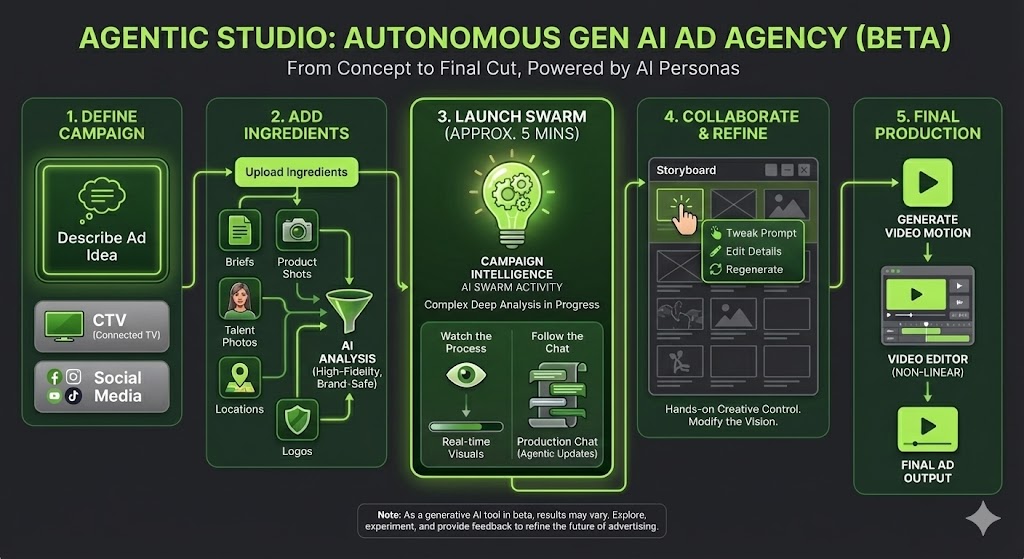
Ruliad is a prototype media planning and ad creation tool built on a patent-pending AI persona-based multi-agentic OS. It empowers you to deploy autonomous director swarms to create, iterate, and optimize video campaigns at scale.
How to Create Your Ad:
- Define Your Campaign: Use the text box to describe your ad idea. Select your campaign type (CTV or Social) to tailor the output format.
- Add Your Ingredients: Click "Ingredients" to upload your campaign assets—briefs, product shots, talent photos, locations, and logos. The system analyzes these to ensure high-fidelity, brand-safe generation.
- Launch the Swarm (Approx. 5 Mins): Click "Launch" to begin. Because our Distributed Creative Swarm performs complex, deep analysis to build your strategy, this process takes up to 5 minutes.
- Watch the Process: Look for the Light Bulb icon to visualize the various intelligence activities happening behind the scenes.
- Follow the Console: You can read the Production Console log in real-time to see exactly what our agents are thinking and doing.
- Collaborate & Refine: The AI will generate an initial storyboard. We encourage you to be hands-on. If a shot isn't perfect, click into it to tweak the prompt, edit the details, or regenerate it entirely. You have full creative control to modify the vision.
- Final Production: Once you are happy with the storyboard mood, click to generate the full video motion. You can then perform final cuts and edits in our non-linear Video Editor.
Note: As a generative AI tool in beta, results may vary. We invite you to explore, experiment, and provide feedback as we refine the future of advertising together.
Clip Miner & Editor
Refine Voiceover
Select Active Campaign
Rename Campaign
Console Setup
Protocol
Team Assembly
Reference Asset
URL Intelligence
Console Behavior
Active Tasks
Export Campaign
Adjust Profile Picture
Drag to position. Scroll to zoom.
Logo Analyzer
Extract technical replication data from any brand mark.
Production Console
Generated Tracks
Generated Takes
Drag preview onto timeline
Ingestion Protocol: Drop Zone Guide
Upload assets to train the AI Swarm on your specific brand context.
Target URL
**Action:** The AI scans your website to extract brand voice, core value propositions, and existing product descriptions. It builds a "Knowledge Graph" of your business instantly.
Logo (TLARP)
**Technical Logo Analysis & Replication Protocol:** Upload a PNG/SVG. The AI deconstructs it into hex codes, font weights, and geometry so it can "re-draw" it perfectly in generated end cards.
Product (Material Scanner)
**Physics Engine:** Upload a clean product shot. The AI analyzes material properties (glass, matte plastic, liquid viscosity) to ensure generated videos respect the laws of physics for your item.
User Script Override
**Absolute Source of Truth:** If you upload a script document (PDF/TXT), the AI Directors stop ideating and start visualizing *exactly* what you wrote. The dialogue and scene descriptions take precedence over all other inputs.
Location (Exterior)
**Architectural Analysis:** Upload a photo of your business, a specific house, or a landmark. The AI extracts the building style, lighting conditions, and surrounding environment to replicate the location in generated shots.
Location (Interior)
**Set Design Analysis:** Upload an interior shot (e.g., showroom, kitchen, office). The AI extracts the decor style, color palette, spatial layout, and lighting mood to ensure indoor scenes match your reality.
Talent (Bio-Token)
**Forensic Face Map:** Upload a photo of your mascot or actor. The system creates a "Bio-Token" allowing it to generate consistent new footage of that same person in different scenes without morphing.
Visual Style (Atmos)
**Atmosphere Extraction:** Upload an image that captures the "Vibe" you want (e.g., Blade Runner neon, Apple minimalist). The AI extracts lighting, color grade, and lens choice.

Reference Video
**Deconstruction:** Upload a competitor's video ad. The AI reverse-engineers their edit pacing, shot types, and script structure so you can replicate their winning formula.
How to use
- Drag & Drop assets into their respective zones in the "Assets & Context" step.
- Wait for the status indicator to change (e.g., "Scanning...", "Extracted").
- Once ingested, these assets become "Immutable Truths" for the AI Directors. They will not hallucinate your logo or product incorrectly.
Title
Description goes here.
Regenerate Ad
Modify the current ad or branch out into a new version.
Quick Voiceover
Edit Text
Clips & Keyframes
Ad Analysis, Versioning & Reverse Engineering
PROTOCOL: FORENSIC_DECONSTRUCTION_v2
Contextually aware deconstruction active.
System Settings
AdCP Network Configuration
View Server SchemaDeploy functions/src/index.ts to enable your custom adcpServer endpoint.
LLM & Voice Keys
LockedEnterprise Vendor Billing Override
Available only after an active Enterprise contract is in place on this account.
This override is for enterprise organizations with direct Google and/or ElevenLabs commercial agreements who want supported LLM, image, video, and voice generation billed against their own vendor commitments instead of standard Ruliad platform credits.
- 1. Contact Ruliad to activate Enterprise override entitlement on your account.
- 2. Once the enterprise contract is active, these fields unlock for your authenticated workspace.
- 3. Your keys stay local to this browser on this workstation and are not packaged into project exports or Hosting payloads.
- 4. Supported Google and ElevenLabs workloads then bill against your own vendor contract or commit.
Used for supported Google-driven LLM, image, and video workflows once Enterprise override access is enabled.
Used for supported voice generation once Enterprise override access is enabled.
Director Architect
Describe the specialist you need. The Architect will conduct deep research and build a custom persona.
Edit Director
Enter Target URL
Enter the website URL you want the Agentic Studio to analyze for brand context.
Terms of Service
Rights and content
Ruliad respects intellectual-property and publicity rights. You may upload or direct the use of content only when you have the rights, permissions, or other lawful authority needed for that use.
Third-party names, marks, or materials may appear for identification, compatibility, commentary, demonstration, or user-directed creative work. Their appearance does not imply sponsorship or endorsement. Rights holders may contact info@theruliad.ai or 310.821.7600 with a rights, attribution, removal, or licensing question.
Terms of Service & Use Agreement
Last updated September 27, 20261. Agreement to Terms
These Terms govern your access to and use of TheRuliad.AI (the "App"). By creating an account or using the App, you agree to these Terms and applicable law. If you do not agree, do not create an account or continue using the App.
2. Intellectual Property Rights
A. Our Intellectual Property
The source code, databases, functionality, software, website designs, audio, video, text, photographs, and graphics on the App (collectively, the "Content") and the trademarks, service marks, and logos contained therein (the "Marks") are owned or controlled by us or licensed to us, and are protected by copyright and trademark laws.
B. Third-Party Rights
Third-party names, likenesses, trademarks, and creative materials remain the property of their respective owners. The App may display them when supplied or directed by a user, when needed to identify or interoperate with a service, or where another lawful basis applies. Unless expressly stated, such display does not imply affiliation, sponsorship, or endorsement.
3. User Representations
By using the App, you represent and warrant that:
- Your registration information will be accurate and current.
- You have legal capacity to accept these Terms and will comply with them.
- You are at least 13 years old and meet any higher minimum age that applies where you live.
- Any human, agent, API client, or automation using your account will act only with your authorization, within the controls provided by the App, and within any stated budget or approval limits.
- You will not use the App for an illegal, deceptive, infringing, or unauthorized purpose.
4. Prohibited Activities
You may not access or use the App for any purpose other than that for which we make the App available. As a user of the App, you agree not to:
- Systematically retrieve or copy App data outside the export, API, agent, or integration features we provide, unless we give written permission.
- Circumvent security, identity, approval, billing, usage-limit, or access-control features.
- Use information from the App to harass, deceive, exploit, or harm another person.
- Upload, generate, or distribute content that you do not have authority to use, or that violates another person’s intellectual-property, privacy, publicity, or other legal rights.
- Upload malware or other material designed to disrupt the App or another user’s systems.
5. Your Content
You keep ownership of content you upload, submit, or create through the App ("Your Content"). You give us a limited permission to host, store, process, reproduce, display, transform, and transmit Your Content only as needed to operate, secure, support, and improve the App and to carry out your instructions. You represent that you have the rights and permissions needed for Your Content and the uses you direct.
6. Service Availability
The App is provided on an “as is” and “as available” basis. To the fullest extent permitted by law, we disclaim warranties that are not expressly stated in these Terms. We do not guarantee that every generated result will be error-free or suitable for every intended use, so you should review important outputs before publishing or distributing them.
7. Limitation of Liability
To the fullest extent permitted by law, Ruliad and its directors, employees, and agents will not be liable for indirect, incidental, special, consequential, exemplary, or punitive damages, or for lost profits, revenue, or data, arising from use of the App. Any limitation that cannot lawfully apply will apply only to the maximum extent allowed.
8. Responsibility for Your Use
You are responsible for your account, instructions, approvals, and Your Content. To the extent permitted by law, you agree to defend and indemnify Ruliad and its affiliates, officers, employees, and agents from third-party claims arising from your unlawful use of the App, your breach of these Terms, or content you supplied without the required rights.
9. Changes to These Terms
We may update these Terms as the App changes. We will post the updated date and provide additional notice when required by law or when a change materially affects your rights. Continuing to use the App after an update takes effect means you accept the updated Terms.
10. Contact Us
For support, complaints, rights questions, removal requests, or licensing discussions, contact us at:
TheRuliad.AI
PO Box 400, Irvine Blvd
Irvine, CA 92620
310.821.7600
info@theruliad.ai
Privacy Policy
Rights and content questions
Ruliad respects intellectual-property, privacy, and publicity rights. For a rights, attribution, removal, or licensing question, contact info@theruliad.ai or 310.821.7600. We will review the request and respond through the appropriate process.
THERULIAD.AI PRIVACY POLICY
1. Introduction
Welcome to TheRuliad.AI. This Privacy Policy explains how we collect, use, disclose, and safeguard your information when you visit our mobile application. Please read this privacy policy carefully. If you do not agree with the terms of this privacy policy, please do not access the application.
2. Collection of Your Information
We may collect information about you in a variety of ways. The information we may collect via the App depends on the content and materials you use, and includes:
- Personal Data: Demographic and other personally identifiable information (such as your name and email address) that you voluntarily give to us when choosing to participate in various activities related to the App.
- Derivative Data: Information our servers automatically collect when you access the App, such as your native actions that are integral to the App, including liking, re-blogging, or replying to a post, as well as other interactions with the App and other users via server log files.
- Mobile Device Access: We may request access or permission to certain features from your mobile device, including your mobile device’s [bluetooth, calendar, camera, contacts, microphone, reminders, sensors, SMS messages, social media accounts, storage,] and other features. If you wish to change our access or permissions, you may do so in your device’s settings.
3. Use of Your Information
Having accurate information about you permits us to provide you with a smooth, efficient, and customized experience. Specifically, we may use information collected about you via the App to:
- Create and manage your account.
- Compile anonymous statistical data and analysis for use internally or with third parties.
- Email you regarding your account or order.
- Enable user-to-user communications.
- Increase the efficiency and operation of the App.
4. Disclosure of Your Information
We may share information we have collected about you in certain situations. Your information may be disclosed as follows:
- By Law or to Protect Rights: If we believe the release of information about you is necessary to respond to legal process, to investigate or remedy potential violations of our policies, or to protect the rights, property, and safety of others, we may share your information as permitted or required by any applicable law, rule, or regulation.
- Third-Party Service Providers: We may share your information with third parties that perform services for us or on our behalf, including payment processing, data analysis, email delivery, hosting services, customer service, and marketing assistance.
5. Security of Your Information
We use administrative, technical, and physical security measures to help protect your personal information. While we have taken reasonable steps to secure the personal information you provide to us, please be aware that despite our efforts, no security measures are perfect or impenetrable, and no method of data transmission can be guaranteed against any interception or other type of misuse.
6. Policy regarding Children
We do not knowingly solicit information from or market to children under the age of 13. If you become aware of any data we have collected from children under age 13, please contact us using the contact information provided below.
7. Contact Us
If you have questions or comments about this Privacy Policy, or if you are a Rights Holder responding to the notice above, please contact us at:
TheRuliad.AI
PO Box 400
Irvine Blvd, Irvine, CA 92620
310.821.7600
info@theruliad.ai
Showcase Video
Launch this template into Video Editor and create your own project.
- Drop images and describe your merge. Gemini will build a first-frame prompt.
- Describe edits you want to make to a still or video shot, including product, talent, wardrobe, framing, or motion changes.
- Ask Gemini to combine multiple shots into one new keyframe concept before generating a new image or video.
- Press Enter to apply notes. Use Shift+Enter for a new line.
Pre-Pro Matrix + Launch Book
Script, directors, specs, talent, product refs, and storyboard guides staged for Turbo Mode.